

 | Tutorial |
This tutorial will give you straight-and-simple 1-2-3 style operations to use the SDK library.
This article doesn't involve too many details. If you need a comprehensive understanding, please read the complete manual topic.
 Get available ports in local host
The port is the interface where the device connects. Using GetPortName methods of the Host class to list all available ports in the local host (computer).
Below sample code lists all available ports.
for (i = 0; i <= (_host.GetPortCount() - 1); i++)
{
    debug.print(_host.GetPortName(i));
}
Connect to Device (USB/COM/TCP/BLE)
Using Connect method to open the port where the device connects for subsequent APIs calling.
You can get all available port names by using GetPortCount and GetPortName APIs. The port name contains the interface name (COM/USB/TCP/BLE) and relevant required parameters (port number,IP-address or MAC address).
For the USB interface, the port name will start with "USB" or "COM".
For the TCP interface, the port name will start with "TCP".
For the BLE interface, the port name will start with "BLE".
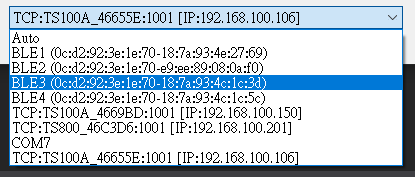
The below sample code shows using Connect method to connect to a device. The second parameter baudrate is only used for COM port interface, for the other interfaces, the baudrate will be ignored.
_uhf.Connect("USB1","AUTO");
_uhf.Connect("TCP:TS100A_4669BD:1001 [IP:192.168.100.150]","AUTO");
_uhf.Connect("BLE3 (0c:d2:92:3e:1e:70-18:7a:93:4c:1c:3d)","AUTO");
Start Inventory
Using StartInventory method to start the process of an inventory round.
Some devices (TS800) may need to call SetTriggerType method to indicate the way of triggering the inventory round.
You can get the inventory tag data (EPC/TID) from the OnTagPresented event.
The below sample code shows using StartInventory method and indicates the return data format is PC+EPC+TID.
_uhf.StartInventory(TagPresetnedType.PC_EPC_TID);
Stop Inventory
Using StopInventory method to stop the process of inventory round.
The below sample code shows using StopInventory method.
_uhf.StopInventory();
Adjust RF Power
Increasing the RF output power may increase the reading tag distance. Using SetRfPower method to adjust the RF output power.
The below sample code shows using SetRfPower method to adjust the RF output strength (19 dbm).
if ((_uhf.SetRfPower(false, 19))) {
    MsgBox("Set RF Power Successful.");
}
The first parameter indicates if you want to save the change to EEPROM.
Read Tag Data
Using ReadTag method to read tag data.
The below sample code shows using ReadTag method to read EPC bank.
dataByteArray = _uhf.ReadTag("00000000", UHF.MemoryBank.EPC, 0, 0);
if (dataByteArray != null) {
    // read OK
} else {
    //read failed
}
Write Tag Data
Using WriteTag method to write data to tag memory.
The below sample code shows using WriteTag method to write binary data to the given memory bank.
result = _uhf.WriteTag("00000000", UHF.MemoryBank.EPC, 2, writeDataByteArray);

if (result==true) {
    MsgBox("Write Successful.");
} else {
    MsgBox("Write Failed.");
}